Tethys One (Home Labs)
Here's my summary of my Home Labs, which is a personal project of mine. I use it to learn and experiment with different tech and softwares.
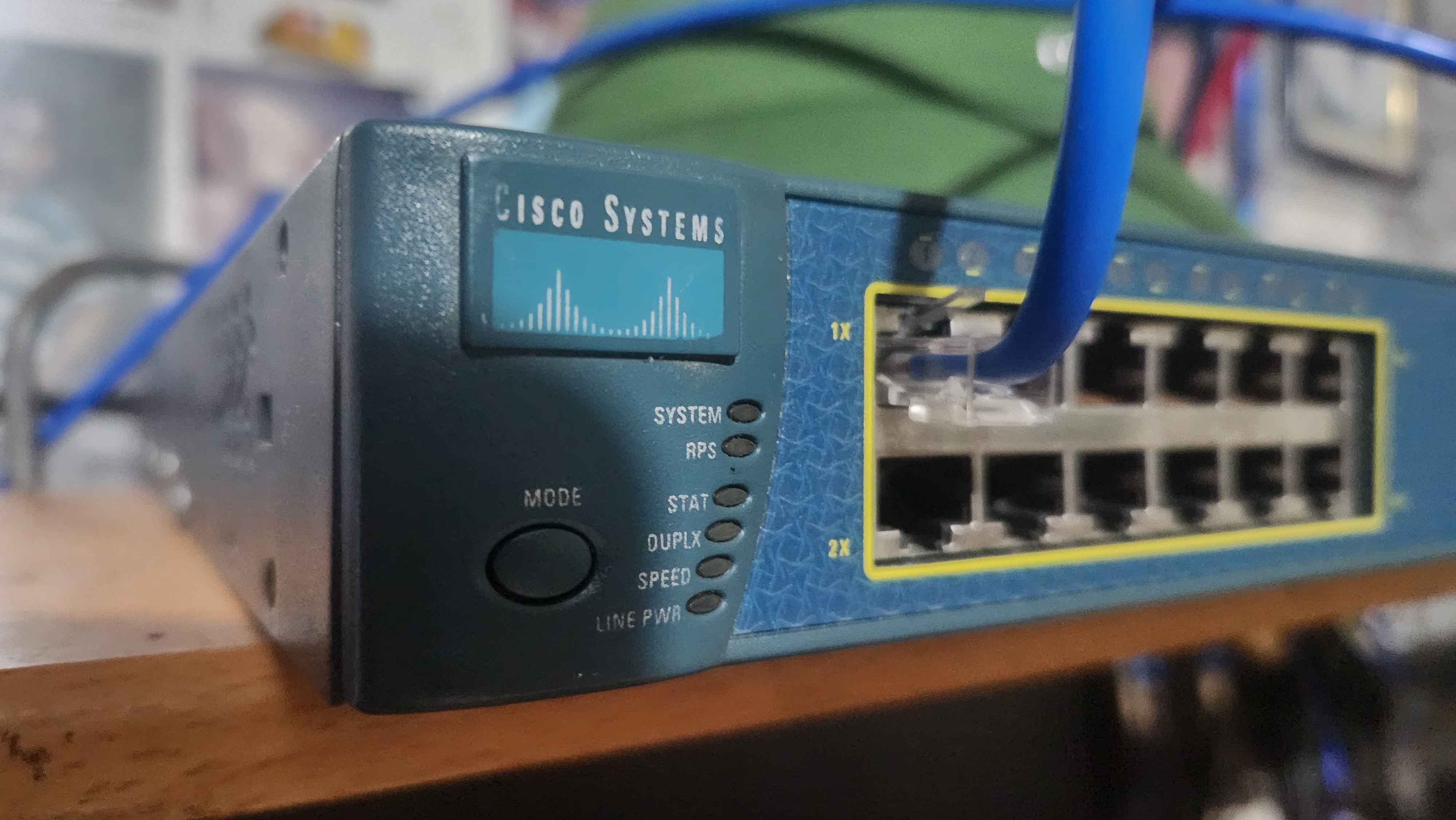
Overview
Tethys One is a personal home lab project that I built during my free time. It is a small-scale server that I use to learn, host, and experiment with different techs. I use this homelab to learn and practice my skills in Networking, IT Engineering, and Administration. It is also a great way for me to learn and experiment with different techs and softwares. Without the risk of breaking anything in a production environment. I also use this homelab to host my personal projects and services, such as my Minecraft Servers.
Hardware
Here are the hardware specifications for my Home Labs setup. This includes the devices, their roles, and their specifications. I will be updating this section as I add more devices to my Home Labs.
TG Desktop PC
- Role
- Primary Hypervisor
- Specs
- i5 6500, 8 GB RAM
Lenovo Aspire Laptop
- Role
- Monitoring and Backup
- Specs
- 12 GB RAM
TP-Link 5-Port Gigabit Switch
- Role
- Unmanaged Switch
- Specs
- -
Cisco Catalyst 3550 Series
- Role
- Managed Switch
- Specs
- Layer 3 Switch, 24 Fast Ethernet Port
TP-Link WR940N
- Role
- Access Point
- Specs
- Single-band Wi-Fi
| Device | Role | Specs |
|---|---|---|
| TG Desktop PC | Primary Hypervisor | i5 6500, 8 GB RAM |
| Lenovo Aspire Laptop | Monitoring and Backup | 12 GB RAM |
| TP-Link 5-Port Gigabit Switch | Unmanaged Switch | - |
| Cisco Catalyst 3550 Series | Managed Switch | Layer 3 Switch, 24 Fast Ethernet Port |
| TP-Link WR940N | Access Point | Single-band Wi-Fi |
# Table 1. Hardware Table
As stated in the table above, the primary hypervisor is a TG Desktop PC with an i5 6500 processor and 8 GB of RAM. The monitoring device is a Lenovo Aspire Laptop with 12 GB of RAM. The network is managed by a Cisco Catalyst 3550 Series switch, while the TP-Link 5-Port Gigabit Switch is used as an unmanaged switch. The TP-Link WR940N serves as the access point for the network. More devices will be added to list as I upgrade my Home Labs Setup.
Softwares
Here's the software stack running on my Home Labs setup. This list will be updated as I add or swap out services.
OpenMediaVault
- Role
- File Storage
- Version / Notes
- Used to store my personal files
Immich
- Role
- Image Vault
- Version / Notes
- It's a Google Photos like storage, but it's self hosted
PiHole
- Role
- DNS Filter
- Version / Notes
- Blocks ads and trackers at the DNS level
Jellyfin
- Role
- Media Server
- Version / Notes
- Used to stream my media collection
Docker Engine
- Role
- Container Runtime
- Version / Notes
- Used to run containerized applications
Portainer
- Role
- Container Management
- Version / Notes
- Used to manage Docker containers
itzg/Docker-Minecraft-Server
- Role
- Minecraft Self-Hosted Server in Docker
- Version / Notes
- Used to host my Minecraft servers
Tailscale
- Role
- VPN
- Version / Notes
- Used to connect to my Home Labs remotely
| Software | Role | Version / Notes |
|---|---|---|
| OpenMediaVault | File Storage | Used to store my personal files |
| Immich | Image Vault | It's a Google Photos like storage, but it's self hosted |
| PiHole | DNS Filter | Blocks ads and trackers at the DNS level |
| Jellyfin | Media Server | Used to stream my media collection |
| Docker Engine | Container Runtime | Used to run containerized applications |
| Portainer | Container Management | Used to manage Docker containers |
| itzg/Docker-Minecraft-Server | Minecraft Self-Hosted Server in Docker | Used to host my Minecraft servers |
| Tailscale | VPN | Used to connect to my Home Labs remotely |
# Table 2. Software Table
More softwares will be added to list as I upgrade my Home Labs Setup Especially the RAM and Storage of the Primary Hypervisor. I will also be adding more services to my Home Labs setup as I learn and experiment with different techs.
Network Topology
Here's a diagram of how the devices above are connected, from the hypervisor down to the switches and access point.
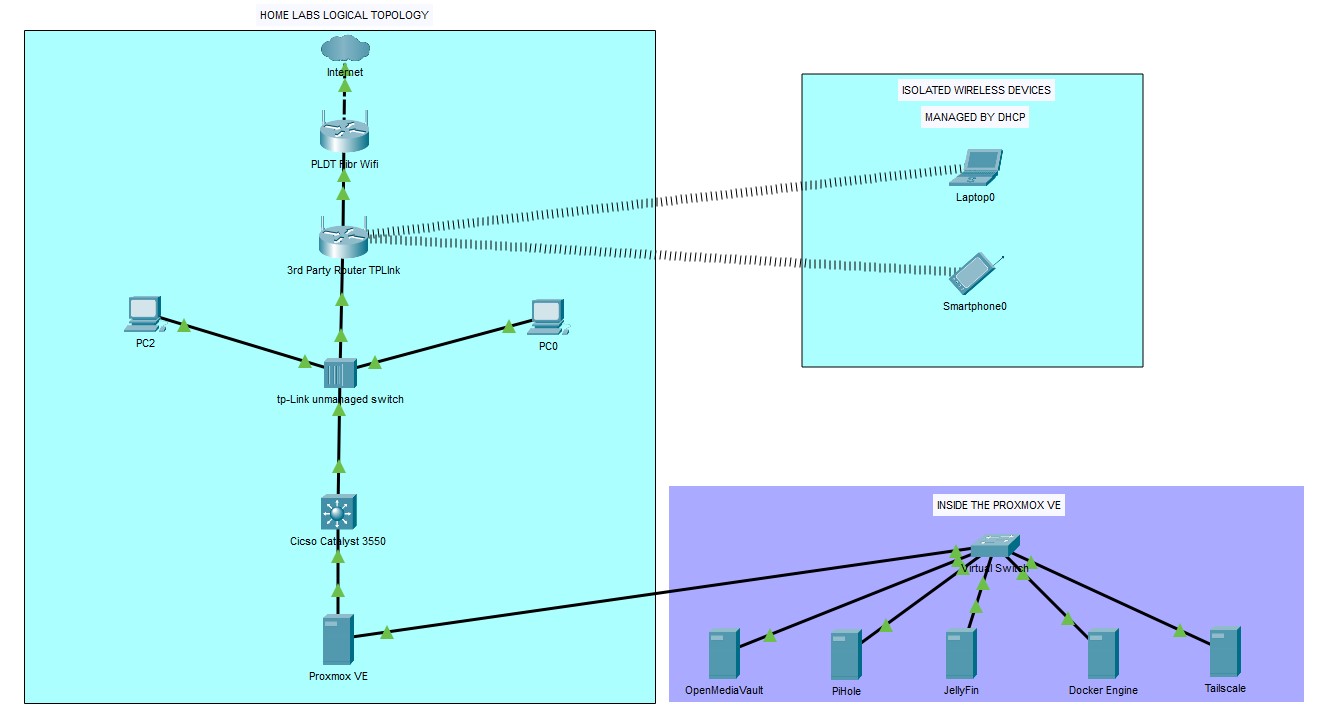
This is the Logical Network Topology of my Home Labs, it made using Cisco Packet Tracer. It starts off with the ISP which is PLDT Home Fiber, and then it goes to the TP-Link WR940N which is in Access Point Mode, Then it goes to the TP-Link 5-Port Gigabit Switch which is an Unmanaged Switch, and then it goes to the Cisco Catalyst 3550 Series which is a Managed Switch. The Cisco Catalyst 3550 Series is connected to the TG Desktop PC which is the Primary Hypervisor in which Proxmox VE is installed.
Inside Proxmox, a virtual switch bridges interconnects Multiple Virtual Machines and containers that provide different network services. These include OpenMediaVault for file storage, Immich for Google photo like Storage, PiHole for network-wide ad blocking, Docker for hosting containers, and Tailscale for remote access to the Home Labs Network.